

When Logitech discontinued its popular line of Harmony universal remotes last year, the company promised that existing products would continue to be supported. That alleged “support” was put to the test for many users last week when Harmony’s integration with Alexa voice control suddenly stopped working without explanation, and the standard array of troubleshooting suggestions that you’ll get out of a Customer Service representative fail to resolve it. If this happened to you, rest assured that the issue can be fixed and your voice control restored. I’ll walk you through it.
[Note: This article was first published in 2022. The Alexa integration with Harmony broke down again in July of 2025, and the following recommendations did not work at first. However, after a couple days, the situation seems to have resolved itself to the point that this process now works again. See the comment chain at the end of this article for more details.]
Like most home theater owners, I have a great number and array of electronics in my system, so many that operating each individually with its original remote is simply not practical. Tying them together in a universal remote programmed with a host of macros is essential. I started with the Harmony brand ages ago and have generally been happy enough to continue with it through the years. Currently, most of my devices are programmed into a Harmony Hub, which I’ve integrated with Amazon’s Alexa. This has made it very simple to turn on my entire home theater system with one simple voice command when I enter the room. At least, it did until the Alexa portion stopped working last week. Although I was still able to operate the Hub manually through the Harmony app on my phone, voice control simply failed to execute. When I told her to “Turn on home theater,” Alexa would make a chiming sound to indicate that the command was acknowledged, but nothing would happen.
My assumption is that Logitech must have pushed through a software update behind the scenes that broke Harmony’s link with Alexa. This isn’t the first time something like that has happened. However, the usual solution to this problem (which is to disable the Harmony skill in the Alexa app and then re-enable it again) doesn’t work this time. I also tried unplugging and resetting both the Harmony Hub and my internet router, to no avail. I tried every other troubleshooting tip on the Logitech web site and on various other web pages I found through Google, but none of them were written recently and none had any effect on this latest breakdown.
After a couple days of frustration, I finally found a solution that actually worked, buried in a thread on Reddit. I make no claims to having solved this problem myself. I offer credit to Reddit posters “Smooth_Distance_6867” and “BeFlatLine.” I’m reposting their instructions here (expanded a bit with additional detail and reworded for clarity) for the benefit of anyone else experiencing this issue who hasn’t ventured to Reddit or come across the answer yet.
Steps to Fix the Harmony and Alexa Link
Before starting, know that you will need your wireless network password, as well as your Logitech user ID and login password. You should have established those when setting up the Harmony Hub in the first place, but it’s a good idea to make sure you’ve got them handy in case your device doesn’t have them saved.
- Unplug the Harmony Hub’s power cable.
- With the Hub unplugged, hold down the Pair/Reset button on the back of the unit. (I used a small screwdriver to press it.)
- While still holding that button, plug the Harmony back in.

- Continue to hold the Pair/Reset button for an additional five seconds. The light on the front of the Hub should start flashing red. You may release the Pair/Reset button once that happens.
- Open the Harmony app on your smartphone, tablet, or other mobile device. Make sure the Location service and Bluetooth in the device are currently active.
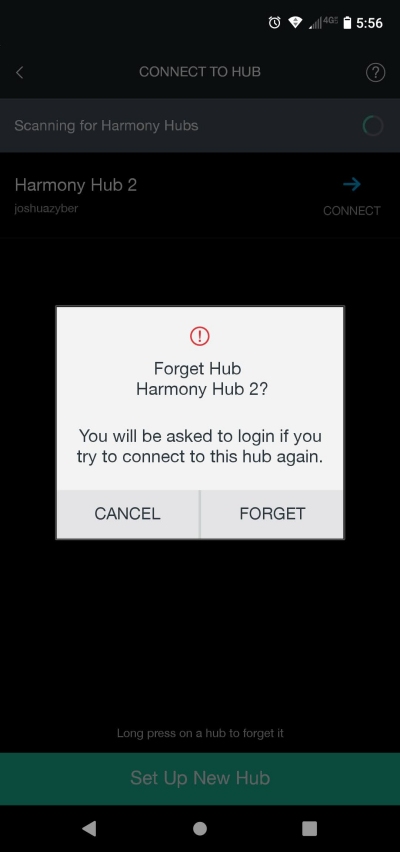
- Navigate to “Switch Hubs.” You should see the name of your Harmony Hub on the page.
- Long-press that Hub name and select “Forget.”
- Close the Harmony app.
- Go to your device Settings and force-stop the Harmony app.
- Under the Harmony app’s Storage & Cache page (still within your device Settings), clear both Storage and Cache.
- Reopen the Harmony app. At the prompt, select “Set Up New Hub.” (Allow access to the device’s Location service if asked.)
- Follow the instructions to set up a new Hub. This will entail reconnecting to your wireless network.
- This should bring you to a Logitech sign-in screen. Log in to your Harmony account. Accept the Software License Agreement.
- You should now be taken to a screen asking if you want to restore your devices or add a new remote. Select “Restore.” (If more than one remote is listed to restore from, be sure to select the correct one you want.)
- After a couple moments, the setup will complete and you will be taken back to Harmony app’s main control screen. If everything worked, all of the devices and activities you expect to see should be listed, just as they were at the start of this process.
- The big difference at this point is that Alexa voice control should also be restored and operational once again. Test it out by telling Alexa to turn on your home theater (or whatever prompt you normally use).
These steps worked for me, and I can now turn on all of my home theater equipment with Alexa. Be advised, however, that you may need to go through these steps all over again if you should unplug your Harmony Hub for any reason or have a power outage. I discovered that the hard way while writing this article. I unplugged the Hub to take the photo you see above, only to find that voice control was inoperative after I plugged it back in. Thankfully, I can confirm that following all of the steps restored everything once more.
I hope this helps someone out there.
 The Video File Blog
Good article. But before I try it, one instruction I don’t understand. Where you say: “Go to your device settings and force stop the Harmony app.” Where exactly is this???
LikeLike
In your phone or tablet, go to Settings/Apps/Harmony then choose Force Stop. That should do it.
LikeLike
Hi. Thank you for sharing valuable info for Harmony Hub users.
I had the same exact problem as mentioned for a few days now and couldn’t find a solution. I read your last update and thank this could be some kind of reset from the Logitech part and tried only to login to my Harmony app and tried just to sync my hub.
After tthat I tried to control it trough Alexa and it worked.
Just needed to sync it on app after doing login.
LikeLiked by 1 person
Thanks for this link. I have been trying for days to get Alexa to work again with Harmony Hub and finally this has succeeded. Allan K
LikeLiked by 1 person
LikeLike
Hello. Thanks for the instructions. Unfortunately, ‘Settings, Apps, Harmony’ does not reveal a ‘Force Stop’ option on my iPad. Only ‘Bluetooth, Local network and Siri.’
LikeLike
The link between Harmony and Alexa appears to have broken yet again, and unfortunately the steps I detailed here don’t seem to be working this time. In fact, after I unlinked my Hub from the Alexa app on my phone, now it won’t even reconnect to that and I have no use of the Harmony Hub at all.
I think something has broken on the Logitech end. Hopefully it gets resolved soon, but part of me fears they won’t put much effort into supporting these products anymore.
LikeLiked by 1 person
Hey thanks for the reply. I guess we all suspected that this day would come. I hope some other, enterprising company, takes up the challenge.
LikeLiked by 1 person
I have the same problem. At first I would ask Alexa to turn on a Harmony-linked device and it would say “Okay” but nothing would happen. Then I tried removing and relinking Harmony skill to Alexa (multiple times). Now when I try a command to turn on a linked device Alexa responds that the device “is in a mode that doesn’t accept requests. Please change its mode in the app or on the device.” Problem with that is that everything is as enabled as it can be in Alexa and I’m not sure what I would enable on the Harmony. If it was working as before, after what I’d done, it should just work.
Hopefully, Logitech hasn’t permanently abandoned support for Alexa.
LikeLike
If you can still use your Harmony app manually, I would advise NOT following the steps in this post. That will disconnect the app from your Logitech account and I’ve had no success reconnecting it the past two days.
LikeLiked by 1 person
Thankfully, my Logitech app and my remote still work properly from what I’ve observed. Thanks for advising all of us accordingly. Hope you can get things working again soon.
LikeLiked by 1 person
Observing same here, but taking advice not to tinker with our sign out of Harmony, I am just leaving it alone and my Harmony remote still operates my devices, just can’t use verbal commands. Will continue to monitor this thread.
Gary L.
LikeLiked by 2 people
Same thing happened to me yesterday. Alexis just not sending or Harmony hub just not receiving commands. I’ve tried everything with no results although app still controls but no longer have voice commands through Alexis. Would be nice if it gets fixed.
LikeLiked by 1 person
I don’t believe they would just pull the plug on it on a random day in July with no notice. More than likely, a person responsible has left or is on vacation, and this app is not a priority to the others on staff. Like everyone else, my hope is that once the issue is raised high enough, it will be addressed. If I knew who to complain to, I would. The issue appears to be not the Harmony app itself, but rather the interface with Alexa, since our Harmony remotes still function.
Gary L.
LikeLiked by 1 person
I agree with you. However, I will note that the Harmony app only still works if you’re currently already logged into it. If you make the mistake of disconnecting it from your account (per the steps that worked last time), it won’t let you back in.
So, please ignore my article above until something changes.
Edit: Scratch all that. See my latest follow-up comment!
LikeLike
Stop the presses! IT’S WORKING AGAIN! I just went through the steps of pairing my Harmony Hub with the app again and it worked this time. I was able to log into my Harmony account and restore all the Hub’s settings. After doing that, the app works, and even better, yes, Alexa controls works too!
I don’t know if you actually need to go through all the steps I detailed in this article from 2022, or if it will start working again on its own when you’re already in the app. First, try giving Alexa a command and see what happens. If that doesn’t work, only then would I go through the process of re-pairing the Hub.
Hopefully this is back up and running for everyone now.
LikeLiked by 2 people
//. Still Broken for me I have tried everything above I see the hub in my alexa app but it just wont connect.I reset my hub and reconnected many times.. My remote works fine and I can control through the harmony app but Alexa just wont connect. I tried deleting the cache and data and all the other tips. I sure hope it comes back.
LikeLike
Good news! My Alexa is now working with my Logitech Harmony hub again. Whatever was the cause seems to have been resolved. Hopefully there is good news for everyone else as well.
LikeLiked by 2 people
Thank you Josh Zyber, Alexa stopped talking to my Harmony a couple of days ago although still able to control Harmony via the App. … I tried all the usual stuff, no joy … very lucky to find this post and even more lucky that you have been kind enough and so thoughtful to update the original fix advice … decided to give it a go … a little tip from me, it’s not bad idea to make sure you have performed a ‘Sync’ via the App before diving in. Moving on, and as some other users have already mentioned , unable to follow some of the steps as the options are not available in the App (force stop and storage and cache page) … just ignored these steps and completed everything else … very pleased to report, everything working again including voice control via Alexa. Many thanks, really appreciate what you have done here and hope others will also be able to get their Harmony’s up and running again by following your advice.
LikeLiked by 2 people
Anyone experiencing issues today with Alexa losing its mind? Can’t seem to recognize my prompt to turn on my home theatre system and is prompting me to re-enable the skill in Alexa. Problem is when I go into Alexa there are no skills available (not even non-Harmony) to enable. Looks like Alexa may be having issues.
LikeLike
Sorry, I was out earlier. Just asked Alexa to turn on my TV and it seems to be working at the moment. If there was a problem earlier, hopefully it’s cleared up for you now.
LikeLiked by 1 person
Mine is working again too. I believe the break was with Alexa. My ecoBee thermostat support sent out an email notification that there were issues with Alexa voice about the same time. Thanks!
LikeLiked by 1 person
Thanks for the helpful article and follow up comments. Was slightly daunted by the drastic nature of some of the steps involved. However this worked perfectly for me to restore the broken Alexa Harmony skill!
LikeLiked by 1 person